For readers searching hi3d for practical 3D-generation reviews, this article compares Tripo and SupaVoxel on cost, speed, consistency, and the resulting candle holder.
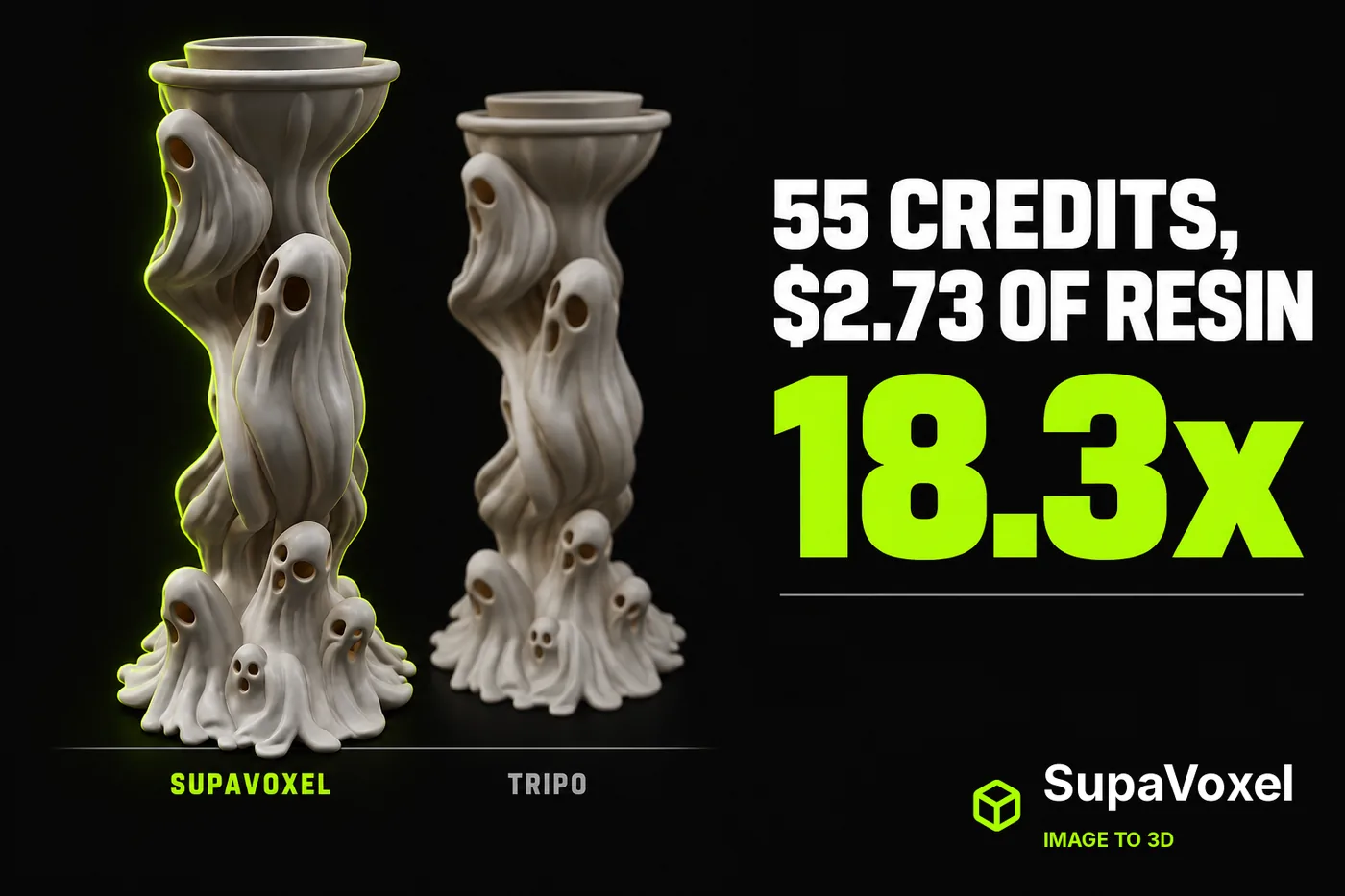
Independent review. I ran both tools on my own accounts, free and paid, with no vendor-provided access or early access of any kind.
My verdict in 60 seconds — Tripo 57/100, SupaVoxel 91/100
One Halloween reference image of a swirling candle holder, two image-to-3D products on the same night, same defaults on both sides, and then a ledger instead of a beauty contest. Tripo charged 55 credits, debited at submit, and returned a 61.36 MB file. SupaVoxel charged 3, and returned a 5.28 MB file. Both objects come out at 120 mm tall, 78.05 cm³ against 77.29 cm³, $2.73 against $2.71 of resin. Tripo is 18.3× the price for 0.97% more object. What Tripo does buy is a predictable clock — not a faster one. Across the ten subjects I ran, SupaVoxel was the quicker tool on seven of them, at a median of 133.6 s against Tripo's 163.5 s, and this candle holder went the same way: 124.3 s against 162.0 s. What Tripo has instead is consistency. Every one of its ten runs landed between 135 s and 189 s, a 54-second band, where SupaVoxel's spread from 100 s to 867 s. Both of those sentences are true, and neither one on its own is.
Here is the scorecard for this one job — one reference image in, one printable candle holder out.
- Credits per generation — Tripo 2/10 (55) · SupaVoxel 10/10 (3) — 18.3×, for the same object
- When you are charged — Tripo 3/10 (at submit, 660 → 605 while the card still says Generating) · SupaVoxel 9/10 (3 shown on the button before upload)
- Price visible before upload — Tripo 4/10 (button reads only "Generate") · SupaVoxel 10/10 (reads "Generate (3 credits)")
- Wall-clock to first model — Tripo 6/10 (median 163.5 s over ten subjects; quicker on 3 of 10) · SupaVoxel 8/10 (median 133.6 s; quicker on 7 of 10, this candle holder among them) — SupaVoxel wins this row
- Predictability of that wait — Tripo 9/10 (135–189 s, a 54 s band, every run) · SupaVoxel 4/10 (100–867 s, a 767 s spread) — Tripo genuinely wins this row, and it is the one that matters if you quote deadlines
- Batch of 100 — Tripo 2/10 (5,500 credits) · SupaVoxel 10/10 (300)
- Features at the default price — Tripo 4/10 (Clean Topology Trial ×2, Generate in Parts and 8K Texture Trial ×1 each) · SupaVoxel 9/10 (all defaults, no metered switch)
- Does it tell you when it finished — Tripo 2/10 (card counts down from 125 s, the job ran to 162 s, no finished-at anywhere afterwards) · SupaVoxel 9/10 (an up-front "Estimated 5–10 minutes", and this run came in under it)
- Cost per millilitre of finished object — Tripo 2/10 (55 credits / 78.05 cm³) · SupaVoxel 10/10 (3 credits / 77.29 cm³)
What is actually wrong with the Tripo bill, part by part: the 55 credits are gone the instant you press Generate, before you have seen anything; the switch that would fix the mesh defects is rationed to two trial uses rather than included; a run of 100 units costs 5,500 credits against 300 while the resin differs by $2 in total; and Tripo never shows a finished-at time, so you cannot tell a client when the file actually landed. For this job I would generate on SupaVoxel and keep the 52 credits.
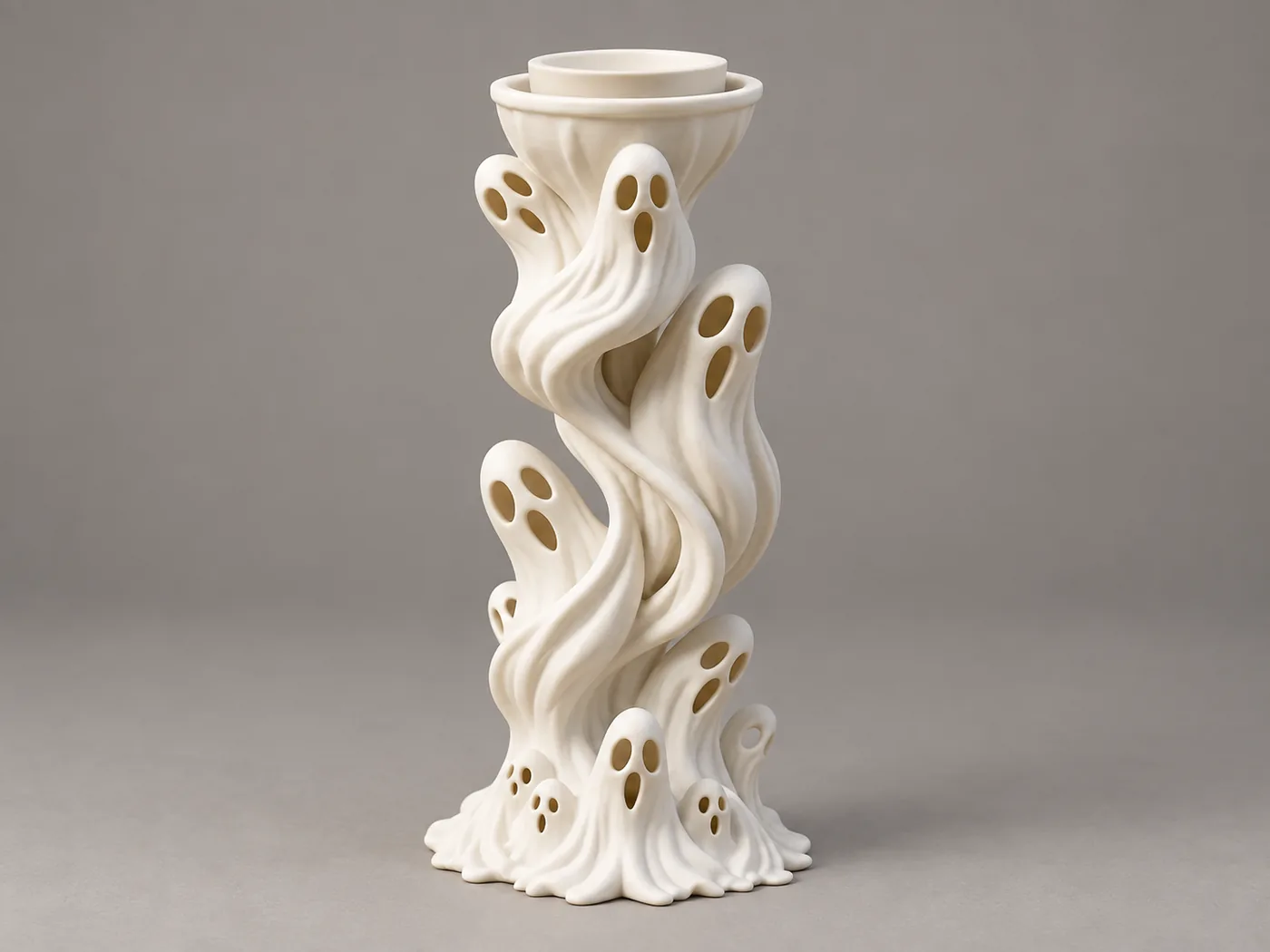
The single input both products received: a 1,520,356-byte PNG (sha256 8781d5ae…), unretouched, no per-product preprocessing.
The price is on the button before you upload — on one side
The SupaVoxel workspace shows Generate (3 credits) on an empty canvas, before any file exists. Upload the reference and the button text does not move a character: still Generate (3 credits). The price does not float with the input.
Tripo's button on an empty canvas reads Generate, full stop. Only after the upload lands does it become Generate 55. You find out what the job costs after you have committed a file to it.
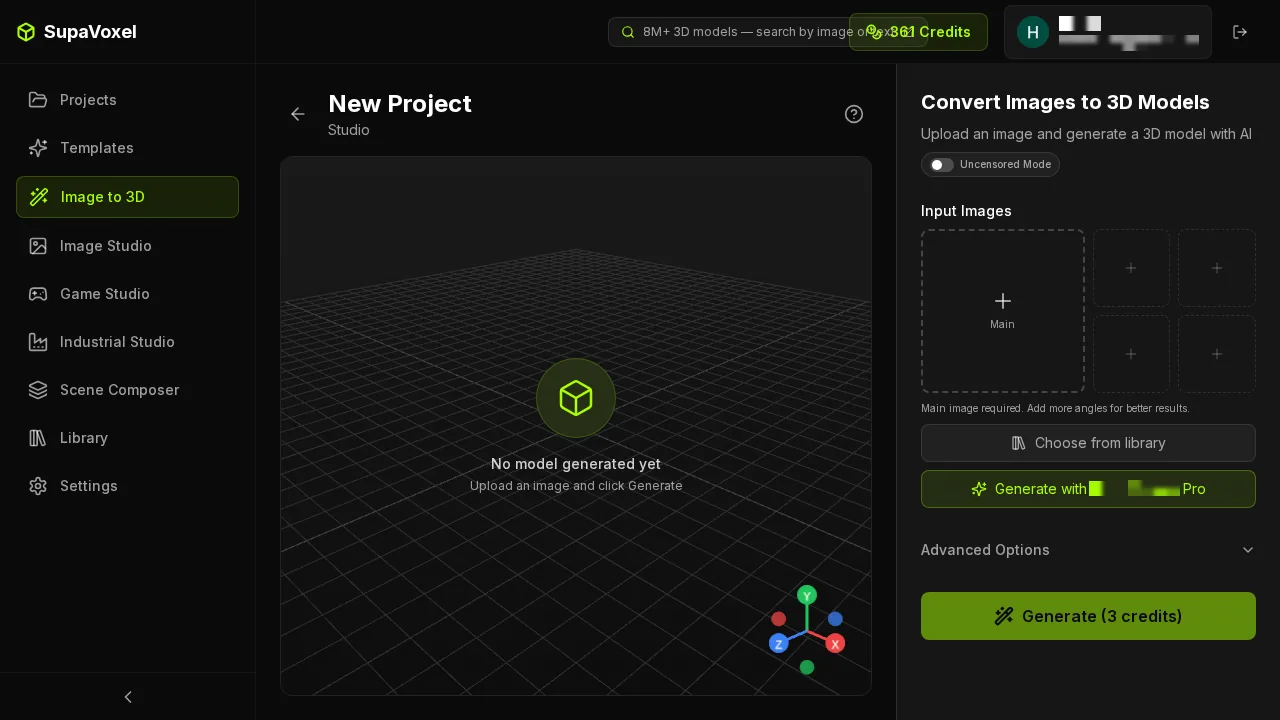
SupaVoxel before upload: the price is already on the button. Main plus four reference slots; Advanced Options stayed folded for this entire test.
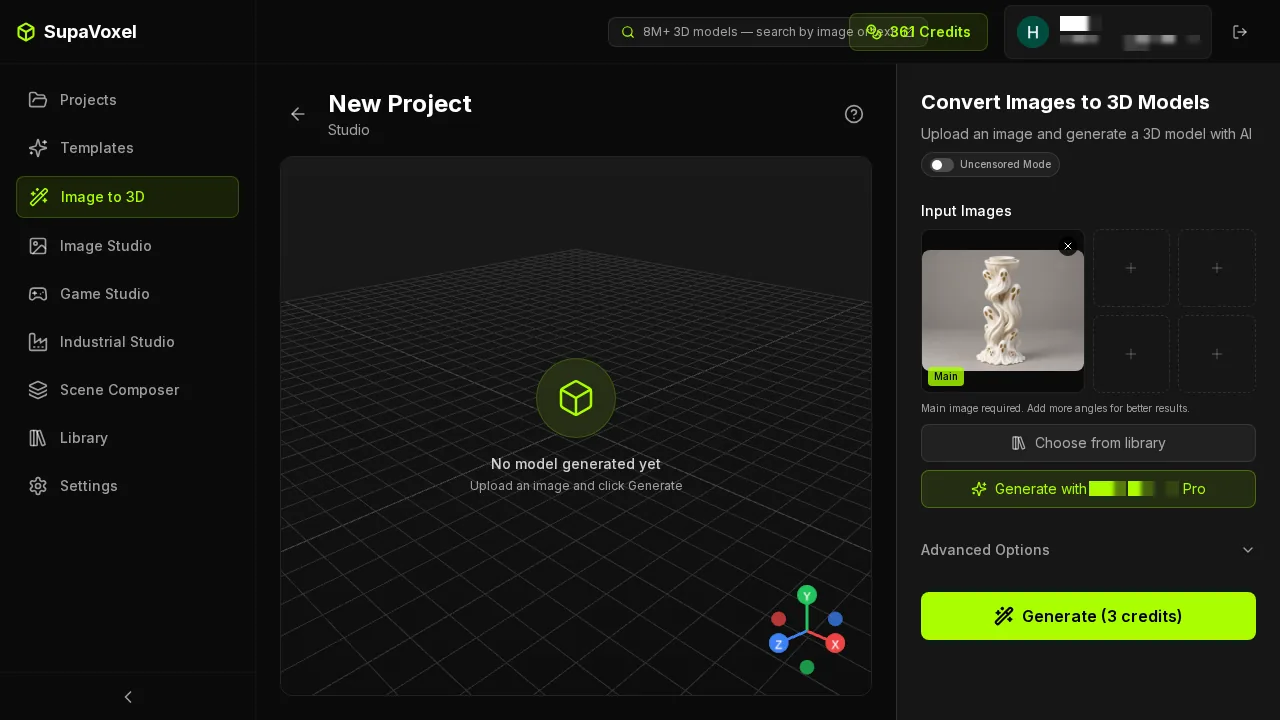
After upload, the same button, the same three credits. Nothing about the file changed the quote.
"Generate 55" is also a safety check, because the upload can fail silently
This one cost me a submission. Tripo's first upload reported success in the network log — and the file input stayed empty, with the button still reading plain Generate. Uploading the identical file a second time took.
So the button label is not decoration on Tripo, it is the only reliable signal that the job has an input attached. Read it before you click: if it does not say Generate 55, you are about to spend a submission on an empty request.

Tripo Studio, pre-upload. Balance 660, Best Quality selected, Clean Topology wearing its Trial ×2 badge, and a Generate button with no price on it.

After the second upload attempt the button finally reads Generate 55. The first attempt reported success and attached nothing.
Tripo debits at submit, not at delivery
Press Generate on Tripo and the balance goes 660 → 605 immediately, while the asset card is still showing Generating... 125s. The 55 credits are spent before a single triangle exists, and there is nothing in the interface offering them back if you walk away.
That matters more than it sounds for a Halloween object like this one, where you are likely to iterate on the reference image two or three times before the ghost faces land where you want them. Three attempts on Tripo is 165 credits spent at submit time, and Tripo's Free Retry counter stops at three. Three attempts on SupaVoxel is 9 credits, with no counter attached.
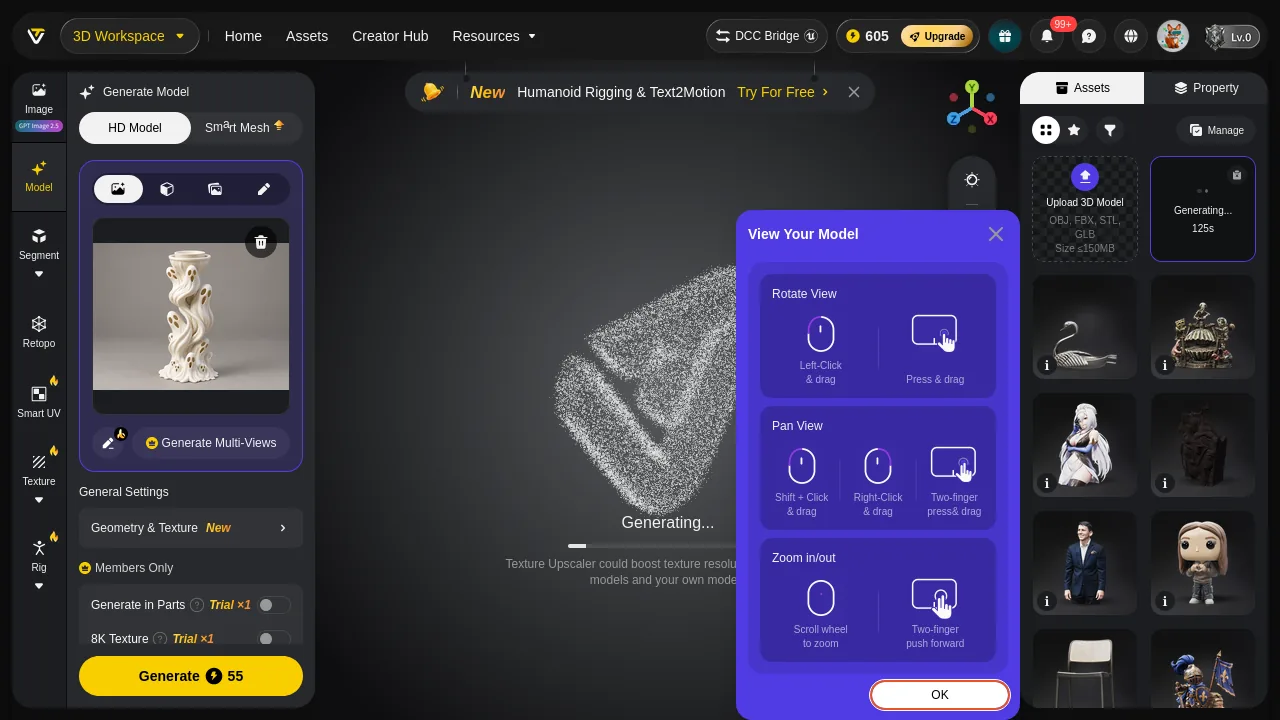
Tripo mid-generation: the balance already reads 605, the card still reads Generating. Above it, a Humanoid Rigging & Text2Motion promo bar; over it, a View Your Model tutorial; in the left column, Members Only entries for Generate in Parts and 8K Texture.
What 55 credits does not include
Three of the things you might assume are in the price are metered separately on Tripo, and all three were off for this run because defaults on both sides is what makes a comparison fair:
- Clean Topology — badged Trial ×2 on the generation bar. This is the switch aimed at exactly the mesh defects the default tier produced here.
- Generate in Parts — Trial ×1, in the Members Only block.
- 8K Texture — Trial ×1, same block.
- Free Retry — ×3, shown on the finished card. Even re-rolling a bad result is rationed.
The ordering is what stings. The Members Only block sits in the left column during generation, which is to say Tripo tells you what you did not buy after the 55 credits have already left the account.
Nothing equivalent is metered on the SupaVoxel side of this test: the run used the product's own defaults — 5 steps, guidance 5.5, octree resolution 256, full generation, background removal on — with the Advanced Options panel never opened, and the result screen puts four inspection modes over the viewport with no trial badge on any of them.
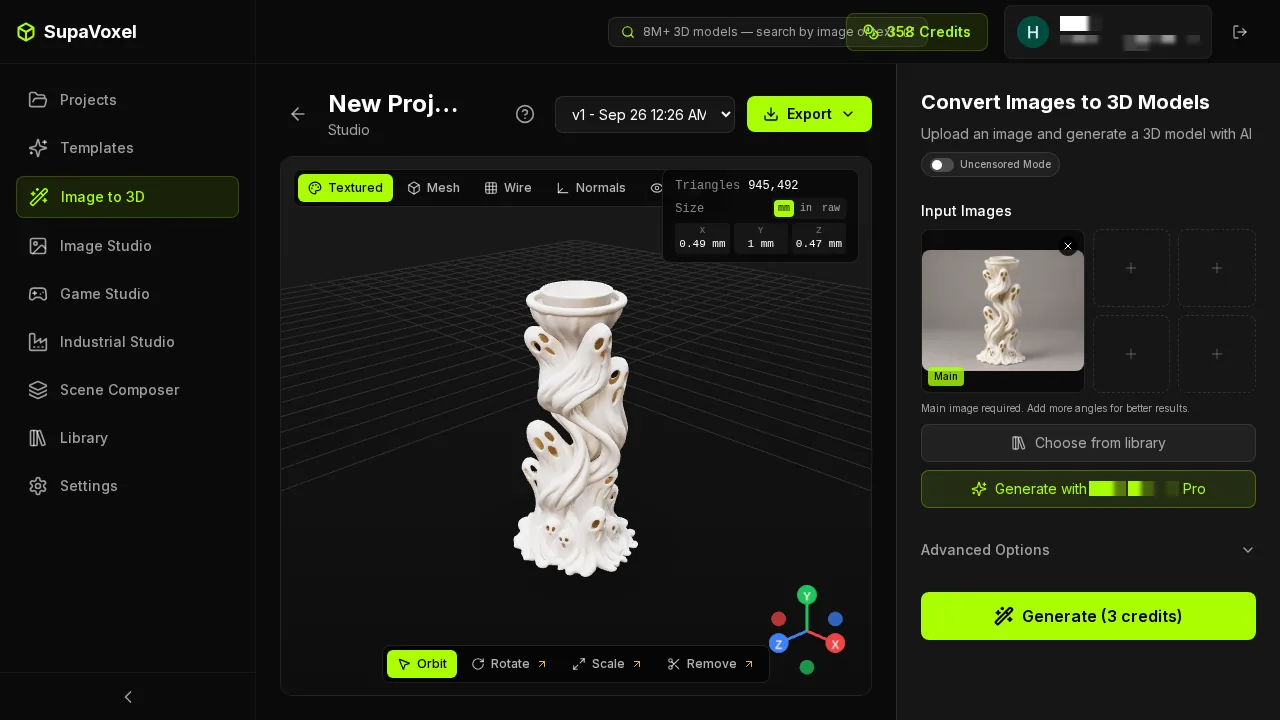
The SupaVoxel result panel reports Triangles 945,492 — the same number the parsed GLB contains. Beside it, the Size readout 0.49 / 1 / 0.47, which is normalised output and the one thing here you have to scale yourself.
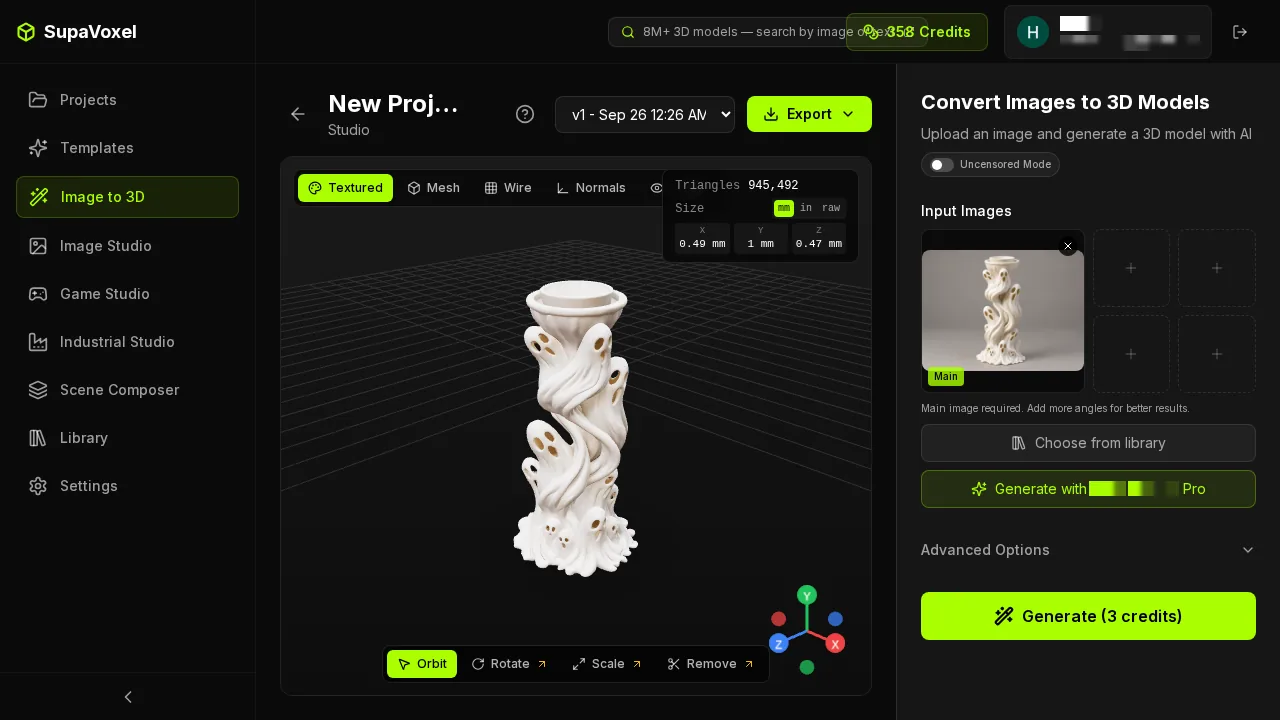
Textured / Mesh / Wire / Normals across the top of the viewport, Export in the same bar. No trial counter anywhere on this screen, and no dialog to dismiss before exporting.
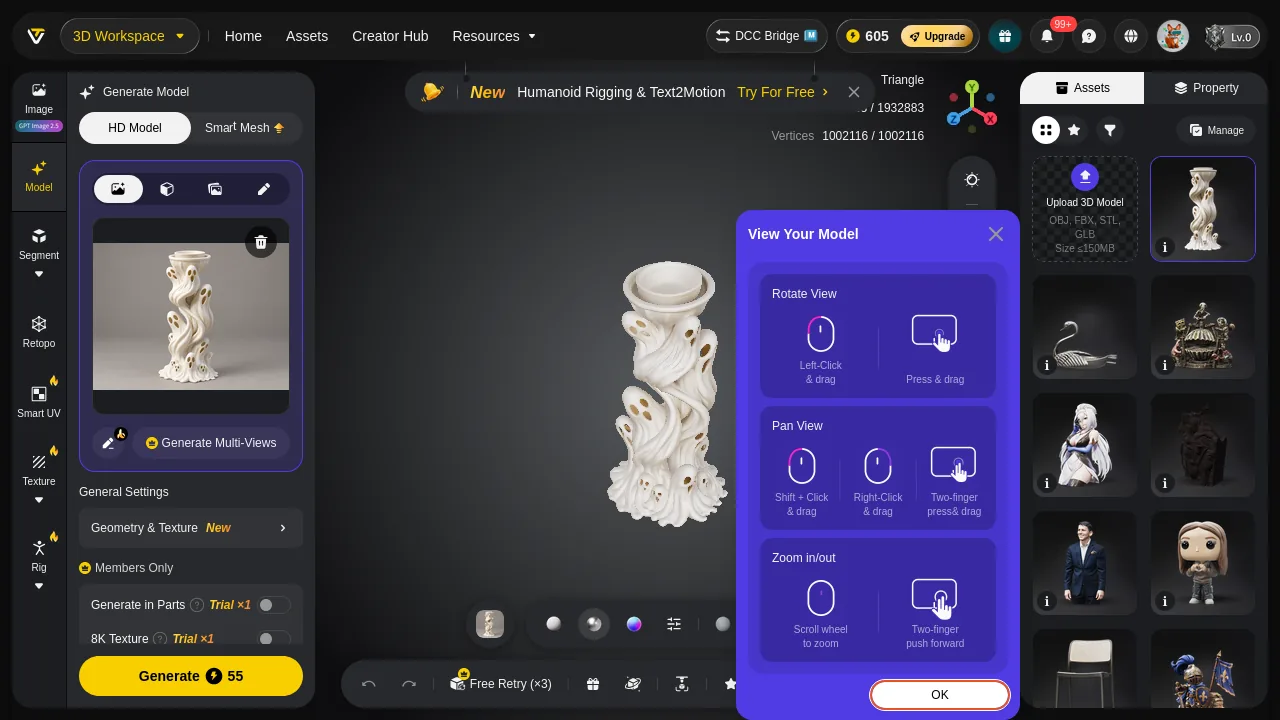
Tripo, finished: Faces 1932883 / Vertices 1002116, matching the file exactly. The tutorial overlay is still parked over half the model, and Free Retry (×3) sits beside the result.
Wall-clock: SupaVoxel is usually faster, Tripo is never surprising
Here is every timing number I actually have. I ran ten subjects through both products the same day at the same settings, one run each, stamping my own clock at submit and watching for the result. Ten runs each is a sample, not a statistic, and I am reporting it as one.
This candle holder first, since one case is what most readers came for: SupaVoxel 124.3 s, Tripo 162.0 s. SupaVoxel was the quicker of the two here by 38 seconds. The Tripo figure is a stopwatch upper bound rather than a reading — its card was still saying Generating at 04:22:50 and had finished by my next check at 04:25:15, so the true moment sits somewhere in the last seventeen seconds of that window. Tripo publishes no finished-at time, so 162 s is as precise as an outsider gets.
Across all ten subjects the same shape holds. SupaVoxel was quicker on seven of ten, at a median of 133.6 s against Tripo's 163.5 s — about 30 seconds a job. If you are waiting on one model, SupaVoxel usually hands it to you first.
And Tripo is far more predictable, which is a separate claim and just as real. Its ten runs fall in a 54-second band, 135 s to 189 s, with no exceptions. SupaVoxel's fall in a 767-second one, 100 s to 867 s. That tail is not a rounding artefact — the armoured-vehicle subject took 867 s on SupaVoxel, the watch stand 250 s, the reindeer 258 s — and when SupaVoxel goes long it goes long by a factor of eight, not by a margin. Whether the median or the spread is the number that matters to you depends entirely on whether you are waiting on a model or promising one to somebody else.
Either way, the wait is not what the 52 extra credits buy. SupaVoxel is usually the faster of the two and costs 3 credits, and the file Tripo hands back still needs two repair passes before it slices.
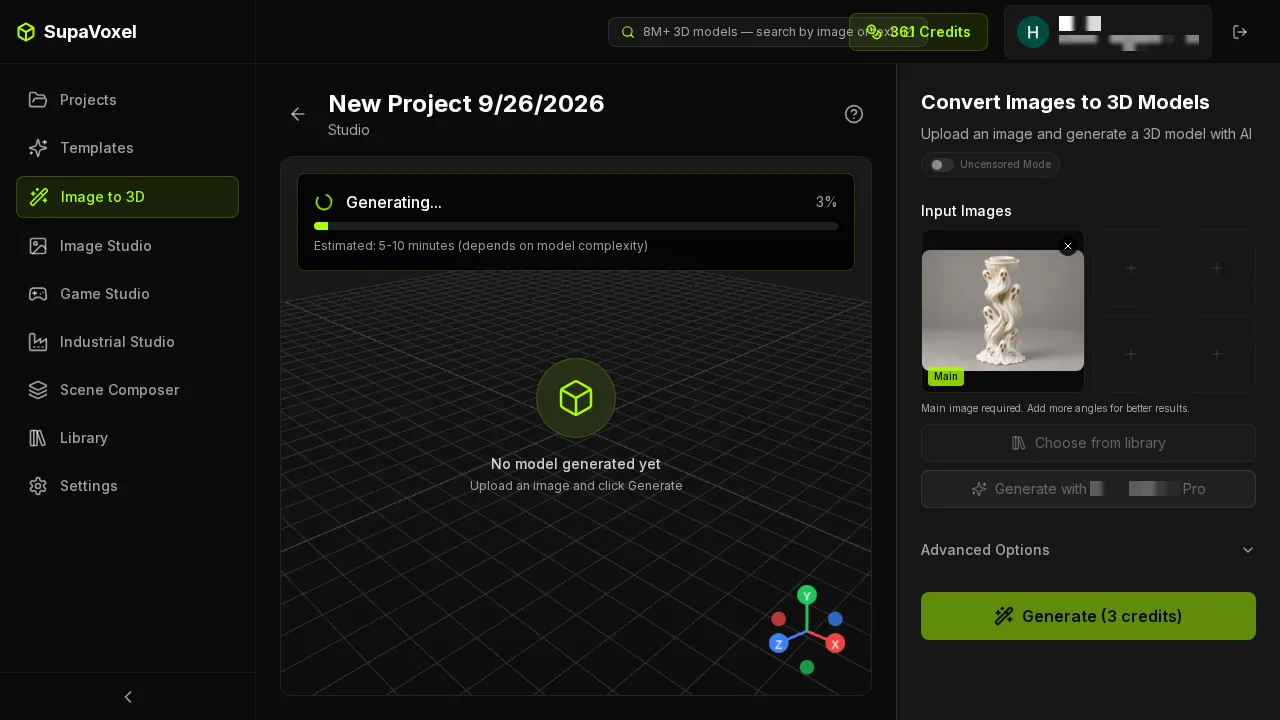
SupaVoxel generating: one progress bar, "Estimated 5-10 minutes", no tutorial and no promo strip over the model. This run beat the estimate at 124.3 s — and the 867 s run on another subject blew straight through it, which is the 767-second spread in one sentence.
Tripo never tells you when the job finished
SupaVoxel puts an estimate on screen while it works and the result simply appears. Tripo hands you a countdown on a card — it counts down, from 125 s — and then nothing. The countdown runs out well before the model shows up, and no finished-at field appears anywhere in the Tripo interface afterwards. The only way to time a Tripo job is to stamp your own clock at submit and keep checking until the card flips, which is exactly why the 162 s above is an upper bound and not a reading.
If your work involves telling a customer when a file lands, that is a missing field, not a nuance — you can quote Tripo's price to the credit and cannot quote its delivery time to the minute.
One unit, side by side
- Credits — Tripo 55 · SupaVoxel 3 · 18.3×
- Charged — Tripo at submit (660 → 605) · SupaVoxel 3 quoted before upload
- Wall-clock, this candle holder — Tripo 162.0 s · SupaVoxel 124.3 s — SupaVoxel by 38 s
- Wall-clock, median of ten subjects — Tripo 163.5 s · SupaVoxel 133.6 s — SupaVoxel quicker on 7 of 10
- Wall-clock, range over those ten — Tripo 135–189 s (54 s band) · SupaVoxel 100–867 s (767 s spread) — Tripo far more predictable
- Delivered volume at 120 mm — Tripo 78.05 cm³ · SupaVoxel 77.29 cm³ · 0.97% apart
- Resin at $35/L — Tripo $2.73 · SupaVoxel $2.71
- File to download — Tripo 61.36 MB · SupaVoxel 5.28 MB · 11.62×
- Repair passes before slicing — Tripo 2 (183 boundary edges, inconsistent winding) · SupaVoxel 1 (366 non-manifold edges)
A hundred candle holders: 5,500 credits against 300
Small workshops do not make one of these, they make a table of them for October. At 100 units:
- Credits — Tripo 5,500 · SupaVoxel 300 · 5,200 credits of difference
- Download — Tripo 6.14 GB · SupaVoxel 0.53 GB · 5.61 GB saved
- Resin at $35/L — Tripo $273 · SupaVoxel $271 · $2 apart
- Serial wall-clock — Tripo 3.8–5.2 h · SupaVoxel 2.8–24.1 h — these overlap; on my ten runs this row cannot be called for either tool
- Manual repair — Tripo 100 × (patch 183 boundary edges + recalculate normals) · SupaVoxel 100 × (one merge pass)
Read those five rows together and the shape of the deal is clear, with one row deliberately left open. The material cost is identical — $2 across a hundred units. The credits are not: 5,200 apart, plus 5.61 GB of downloads. The clock, though, I cannot settle at this scale from ten runs: 3.8–5.2 h against 2.8–24.1 h overlap, so a hundred candle holders might finish sooner on SupaVoxel or take five times as long, and I have no honest way to narrow that. What I can say is that whichever way the clock lands, Tripo also hands you a hundred hole patches and a hundred normals flips for its 5,500 credits.
The one row where 55 credits buys something physical
Fairness requires this section. Tripo's mesh is genuinely finer: mean triangle edge 0.2033 mm against 0.292 mm at 120 mm, 1.44×. It ships three 4096² texture maps against SupaVoxel's three 2048² maps. If your output is a close-up material render rather than a print, that is worth real money and Tripo earns the sale.
It just does not reach this job. A 0.4 mm nozzle already sits above both meshes — Tripo's mean edge is 0.51× of the nozzle, SupaVoxel's 0.73× — so the slicer flattens the difference into the same extrusion path. You are paying 18.3× for precision the tool cannot express, unless and until you move to SLA.
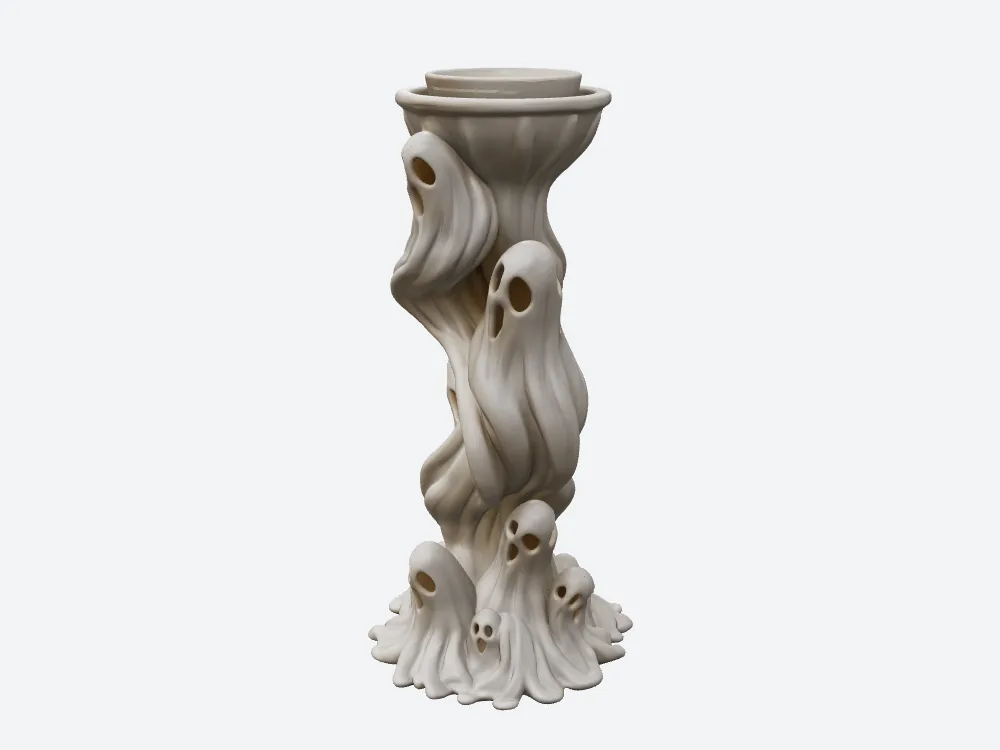
Tripo's candle holder, 55 credits, 61.36 MB, 78.05 cm³ of resin at $2.73.
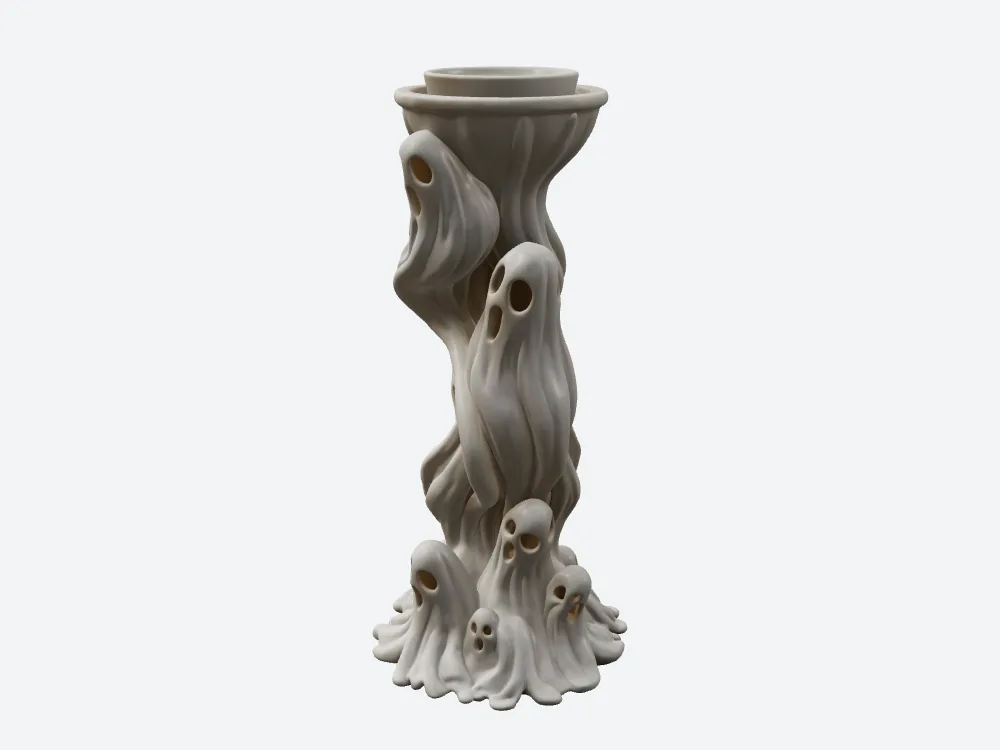
SupaVoxel's, same camera and lighting: 3 credits, 5.28 MB, 77.29 cm³ at $2.71. The 52-credit gap is not visible here, and it is not visible on the print either.
Final verdict: Tripo scores 57, and bills like the object is different
Tripo Studio delivers a working candle holder — pierced eyes, continuous swirl, a wax-tight cup — and it delivers it on a schedule you can quote: 135 s to 189 s across ten subjects, a 54-second band with no exceptions. That is the one structural argument for the 55 credits, and I have made it twice. What it is not is speed: SupaVoxel was the quicker tool on seven of those ten subjects, on a median of 133.6 s against 163.5 s, and on this candle holder by 38 seconds. Everything else in the ledger goes the same way. Tripo takes the credits at submit, before you see anything. It does not show a price until you have uploaded. Its first upload can report success while attaching nothing, so the price on the button is also your only integrity check. The features that would repair the file it hands back are metered at Trial ×2 and Trial ×1. It never tells you when the job finished. And at a hundred units it wants 5,500 credits where the resin bill differs by $2.
SupaVoxel's weaknesses in this test are real: its ten runs spread from 100 s to 867 s against Tripo's 135–189 s, so even though it is usually the quicker of the two, it is the one you cannot promise a time on — the slowest run in this batch was over fourteen minutes; its mesh is 1.44× coarser; its maps stop at 2048²; and its output is unitless — the panel reads 0.49 × 1 × 0.47 with Y at exactly 1, so you scale it yourself before slicing.
Which one I would use for this job
For "one reference image in, one printable candle holder out, repeated through October", SupaVoxel is the cheaper ledger by a distance: 3 credits quoted on the button before you upload, 5.28 MB to move, an estimate on screen while it works, a wait that was the shorter of the two on seven of my ten subjects including this one, and 300 credits for a batch of 100 where the alternative is 5,500. What you give up is the ability to promise a delivery time: Tripo would have told you 135–189 s and meant it. If that is what your week runs on, Tripo is the one to buy, and the 52 credits are what it costs.
Originally published on Medium: Tripo Credits Review 2026: 55 Credits for $2.73 of Candle Resin.