If you’re researching hi3d for image-to-3D work, this independent Meshy AI 3D and SupaVoxel test offers a close look at the details worth checking in a VR helmet model, from texture resolution to visor trim.
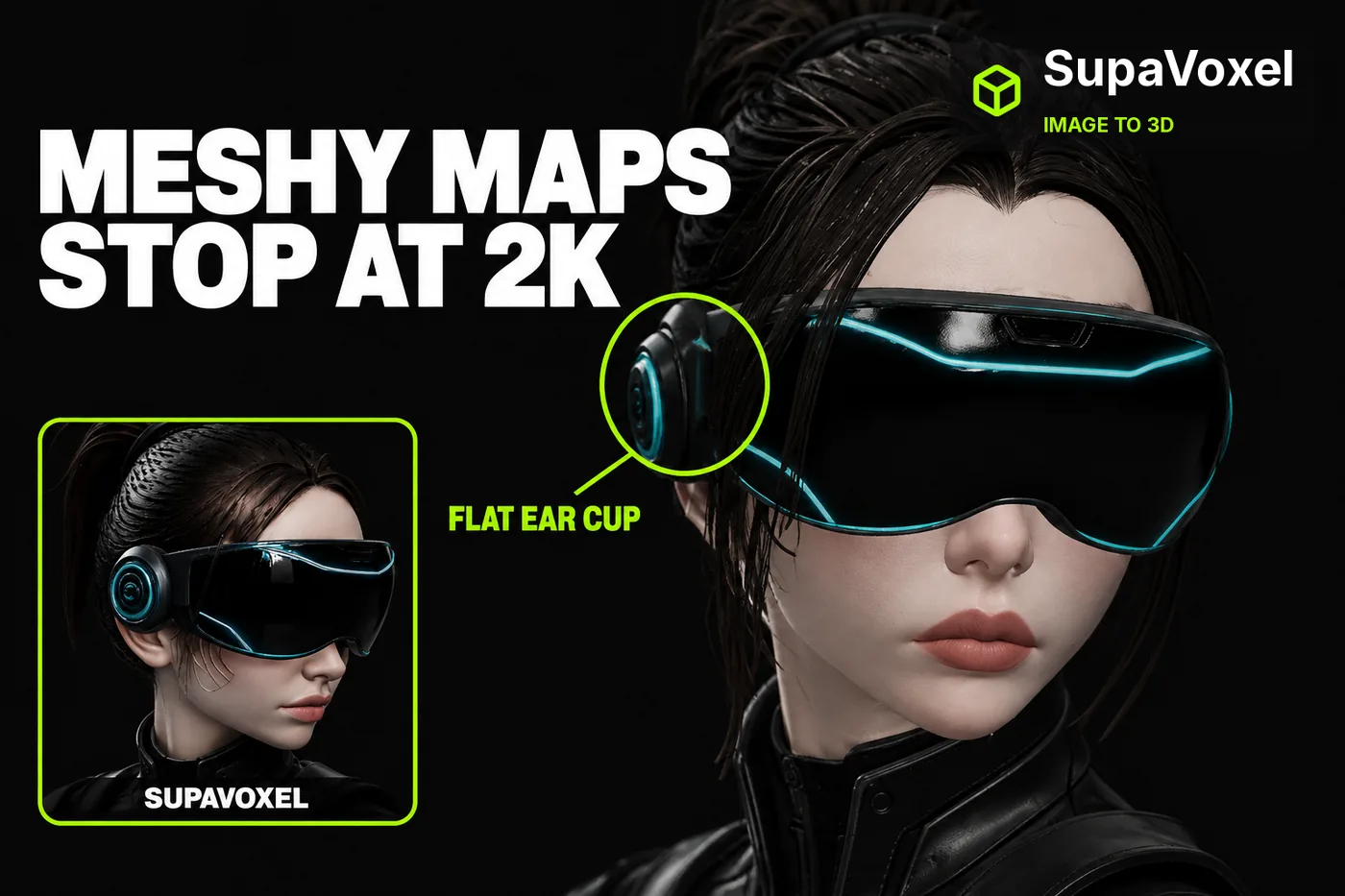
This is an independent test. Nothing here came from vendor access: both tools were used on my own free and paid accounts.
The reference picture was the easy part.
A visored bust on a round plinth. Cyan trim down the shoulder plates. A bound ponytail. Ear cups with a raised ring and a centre boss.
I wanted that in 3D, without hiring anyone.
Everyone I asked pointed at the same two tools — Meshy and SupaVoxel — so I ran the identical image through both and then zoomed all the way in on what came back.
That's when the two files stopped looking the same.
My verdict in 60 seconds — Meshy 62/100, SupaVoxel 88/100
Mine, for this one job. One image, one run per tool — not a lab study.
- Map resolution — Meshy 2048×2048 vs SupaVoxel 4096×4096 · Meshy 5/10 · SupaVoxel 9/10 — Meshy paints the whole bust with a quarter of the pixels; SupaVoxel's maps still hold panel lines and two-pixel trim when a user leans in
- The ear cup — Meshy a flat dark disc vs SupaVoxel a ring and raised centre · Meshy 6/10 · SupaVoxel 9/10 — Meshy loses the machined part the reference clearly shows; SupaVoxel keeps the ring, the boss and the rim arc
- The ponytail — Meshy loose strands vs SupaVoxel one bound tail · Meshy 6/10 · SupaVoxel 9/10 — Meshy frays the hair into string across the temple; SupaVoxel keeps the gather, the band and the taper the reference has
- The collar — Meshy one rolled form vs SupaVoxel stacked segments · Meshy 6/10 · SupaVoxel 9/10 — Meshy melts the neck armour into a single glossy roll; SupaVoxel resolves the rings, the panel-lined plate and the weave underneath
- The visor edge — Meshy a broad slab with one trim line vs SupaVoxel a bevelled rim · Meshy 6/10 · SupaVoxel 8/10 — Meshy flattens the visor and runs the trim straight across it; SupaVoxel gives it an actual bevel and follows the rim
- Triangles behind the shading — Meshy 2,490,490 vs SupaVoxel 1,487,122 · Meshy 6/10 · SupaVoxel 8/10 — Meshy brought a million more triangles and still lost the details above; SupaVoxel gets more out of fewer
- Embedded texture maps — 3 vs 3 · Meshy 7/10 · SupaVoxel 7/10 — a tie, and worth saying: Meshy is not shipping fewer maps, only smaller ones
- The invented back — no reference on either side · Meshy 6/10 · SupaVoxel 6/10 — a tie by necessity: the source picture showed only the front, so neither tool can be scored for likeness back there
Four things I keep pointing at when people ask me about this.
Meshy's three maps are 2048×2048. The other file's are 4096×4096. Four times the pixels doing the same job.
In the close-up, Meshy's ear cup is a flat disc. The reference has a puck with a ring and a boss.
Meshy's hair breaks into strands across the temple where the reference has a gathered tail.
And Meshy's collar rings merge into one glossy roll instead of stacked plates.
I kept the sharper file. It came out of supavoxel.com, if you want to see it.
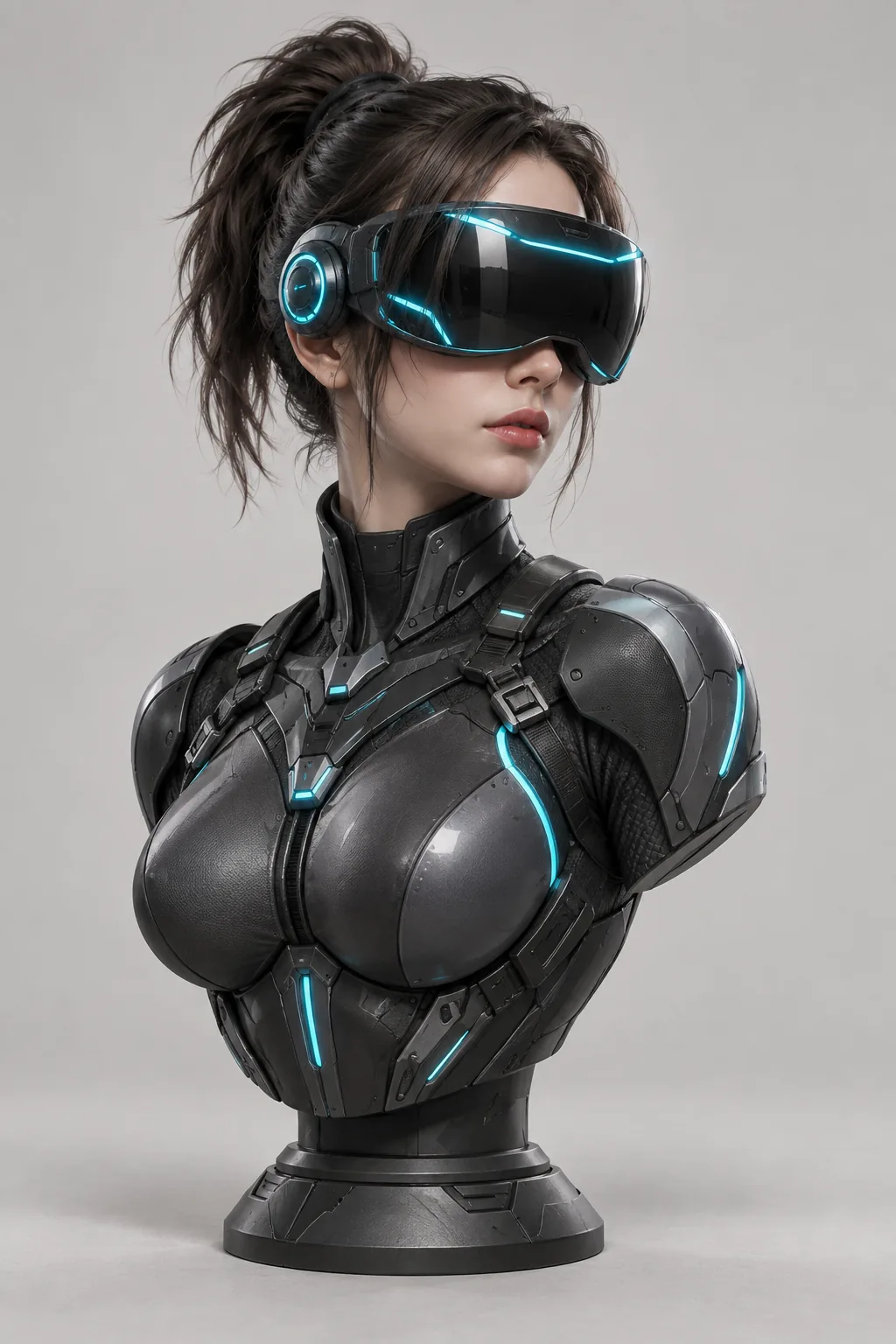
The single reference image both tools received. No text prompt on either side — just this picture.
Does it actually look like the picture you fed it?
That's the only question that matters here. Not polygon counts. Not file size.
Two words first, because they explain everything below.
A texture map is the image wrapped around the model — the paint, the panel lines, the glow. Resolution decides how much of it survives when you get close.
A map at 2048 pixels has a quarter of the pixels of one at 4096. Same surface, a quarter of the paint.
That's the whole story of these close-ups.
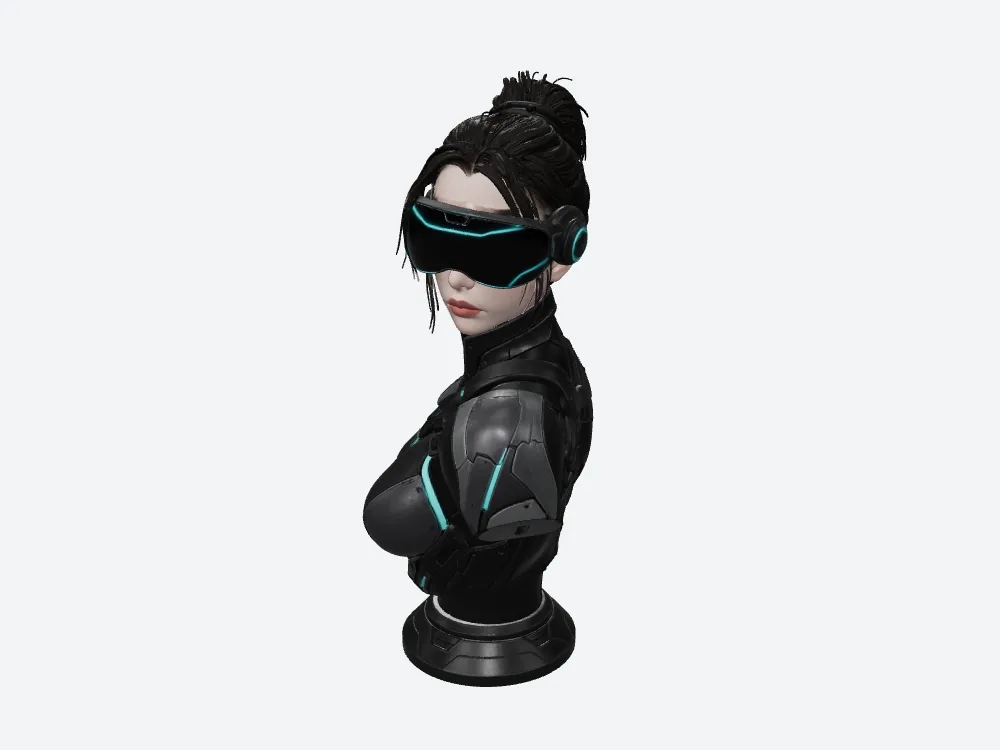
Meshy's bust, rendered offline in my own viewer with fixed lighting.
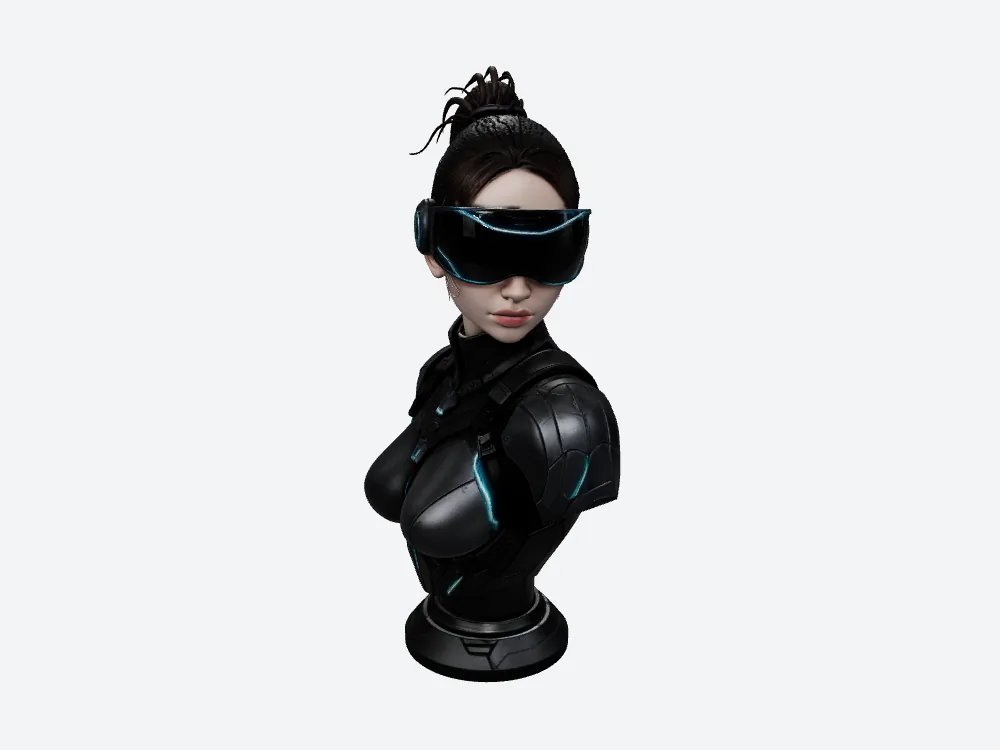
The other file, same camera numbers and lights. Each file carries its own built-in orientation, so the angles differ slightly — this isn't an overlay.
Meshy gives you a quarter of the pixels
Both files embed exactly three maps, so Meshy isn't skimping on the count.
The difference is size: Meshy at 2048×2048, the other file at 4096×4096.
Four times the pixels. On every map.
For a bust whose whole appeal is thin panel lines and cyan trim two pixels wide, that factor of four is the difference between "detailed" and "mushy" up close.
And in VR, everything is at arm's length. Your user walks up and puts their face six inches from the model.
Look at the ear cup — Meshy flattened it
Here's the first crop. Same camera, same frame on both.
In Meshy's version the ear cup is a dark disc with almost no relief. In the reference it's a cylinder — raised ring, centre boss, a cyan arc around the rim.
The other file keeps the ring and the boss.
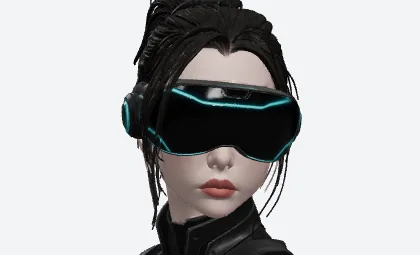
Meshy's visor and ear cup, cropped from the front render.
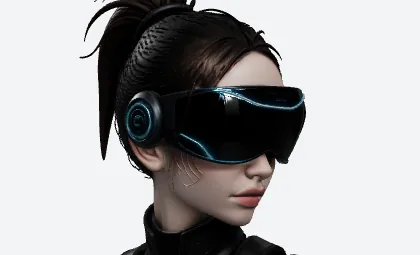
Same frame, other file. The ear cup still reads as a machined part.
One caveat: the two models sit at slightly different angles, so these crops are the same picture frame, not the same patch of surface. Judge the parts, not the pixels.
If your character wears gear, the gear is what people look at. Meshy softened it.
The ponytail Meshy turned into string
Same crop, second Meshy problem.
Meshy's hair falls into thin separated strands across the temple. The reference has one gathered tail with a visible band. The other file keeps the gather and the taper.
Dealbreaker? Depends. For a background NPC, no. For the hero asset people walk up to and stare at — yes.
You'd be fixing that by hand — an afternoon in a sculpting tool, or pick the file that didn't do it.
Meshy's collar goes soft where the armour should stack
Third crop, around the back of the neck — and Meshy softens it again.
Meshy gives you one rolled collar with a broad highlight sliding across it. The other file resolves stacked segments, a panel-lined plate, two harness straps and a woven layer underneath.
That's not subtle. That's a different piece of costume design.
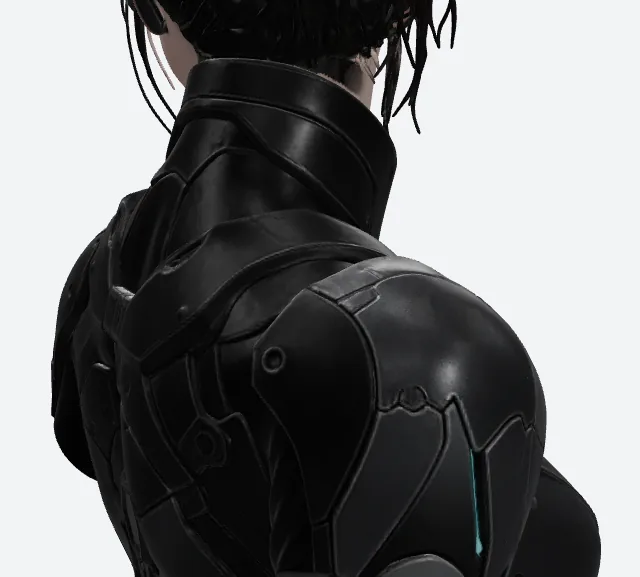
Meshy's rear collar — one smooth roll with a broad specular band.
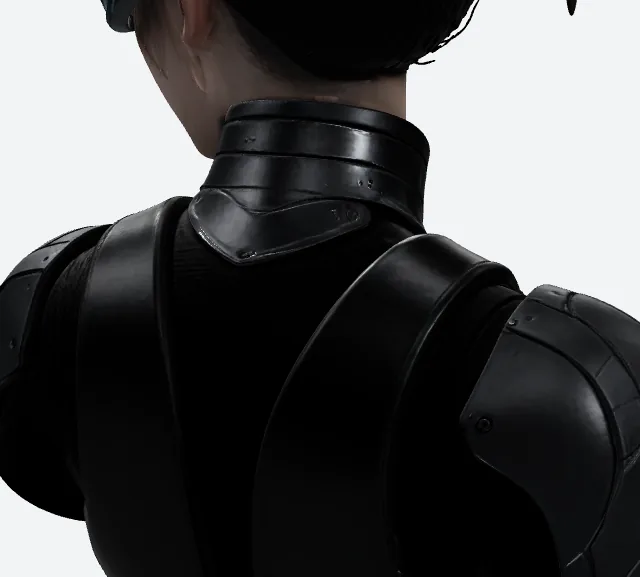
Same frame, other file: segmented rings, a panel-lined plate, visible weave under the strap.
More triangles didn't save Meshy here
This is the part that surprised me.
Meshy's file carries 2,490,490 triangles and 1,331,208 vertices. The other one: 1,487,122 and 944,806.
Meshy brought roughly a million more triangles to the same bust — and still lost the ear cup, the ponytail and the collar rings.
So the missing detail isn't a geometry problem — Meshy had geometry to spare. It's the paint, and Meshy's paint is a quarter of the resolution.
More triangles is not more detail. Anyone selling you a polygon count as a quality metric is selling the wrong number.
What's underneath the paint, in case you're wondering
If the maps are doing the work, what's the geometry doing?
Meshy's file: 2,490,490 triangles and 1,331,208 vertices. The other one: 1,487,122 and 944,806.
Vertices are the corners your engine uploads; triangles are the shards it draws between them. Meshy sends more of both.
Give those numbers a plain memory layout — position, normal and texture coordinate per vertex, three 32-bit indices per triangle — and Meshy's geometry comes to about 72.48 MB against 48.08 MB. Arithmetic with a stated layout, not a reading off a headset.
So here's the odd shape of this comparison. Meshy is heavier in geometry and lighter in textures. The other file is the reverse. If you only ever check one of those two budgets, you'll pick the wrong file for your device.
Check both. They pull in opposite directions.
And the file you actually carry home
Worth knowing before you fall in love with either render.
Meshy's export is 79,664,932 bytes. The other file is 12,385,676. Both GLB, same export click.
On a steady 12 Mbps connection that's about 53.1 seconds of transfer against 8.3; on 100 Mbps, 6.37 seconds against 0.99. Arithmetic — bytes × 8 ÷ bandwidth, ignoring latency and decode — but it's the wait your user feels.
Here's the scene that made me care. A product page where someone can spin the model and pinch to zoom. They want to see the ear cup. That's the whole reason the detail matters.
With Meshy's file they're watching a progress bar for the better part of a minute before they can zoom at all. The sharpest texture in the world doesn't help if nobody waits for it.
Stack up a library and the gap compounds: a hundred assets is 7.97 GB at Meshy's size against 1.24 GB. That's the same file counted a hundred times, a capacity exercise rather than a hundred real runs.
And on the ledger, a hundred runs would be 3,500 Meshy credits against 300 — two different plans, two different units, still not a price.
There's a detail in the SupaVoxel export menu that solves most of this, and I nearly scrolled past it: you get a compressed GLB and an original-size GLB from the same run. So the product page takes the 12,385,676-byte version that loads fast enough for someone to actually reach the zoom control, and anything with a fussy importer takes the original-size one. Meshy gives you a single GLB and leaves you to make it work in both places.
One generation, two deliverables. That's the part that changed how I plan these jobs.
The back nobody gave Meshy, or anyone else
Being honest about this section: the reference only showed the front. Everything behind the shoulders was invented, by Meshy and by the other tool alike.
So don't score it for likeness. Score it for whether the invented structure holds together.
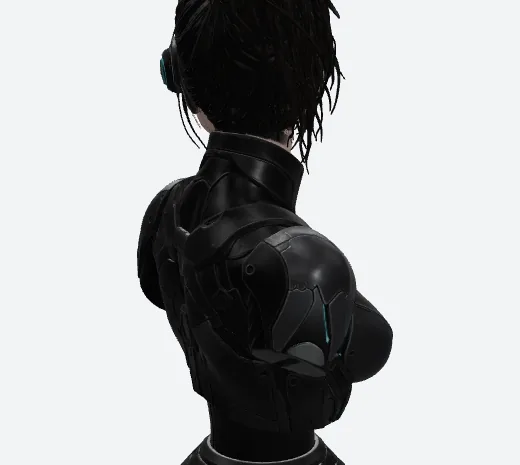
Meshy's back armour — overlapping soft plates, one cyan trace, hair trailing over the shoulder.
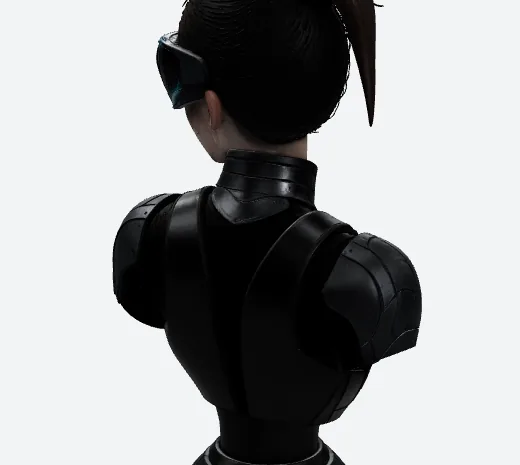
Same frame, other file: a symmetric pair of shoulder plates, a central seam, a harness strap.
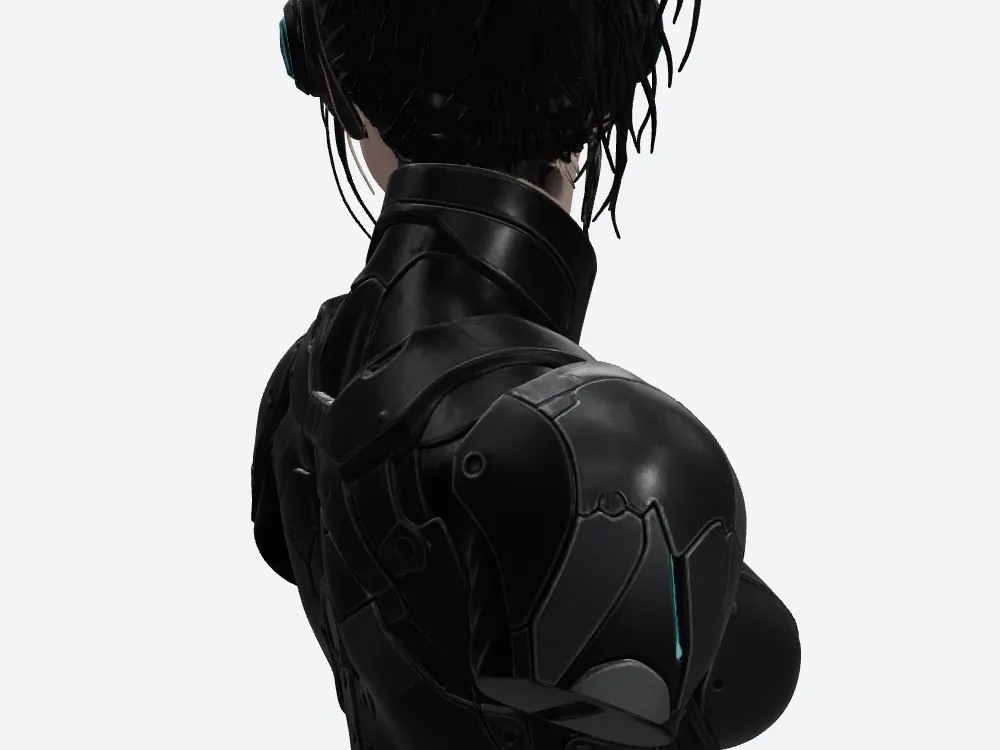
Meshy's back close-up. This is where you'd look for holes and collapsed folds.
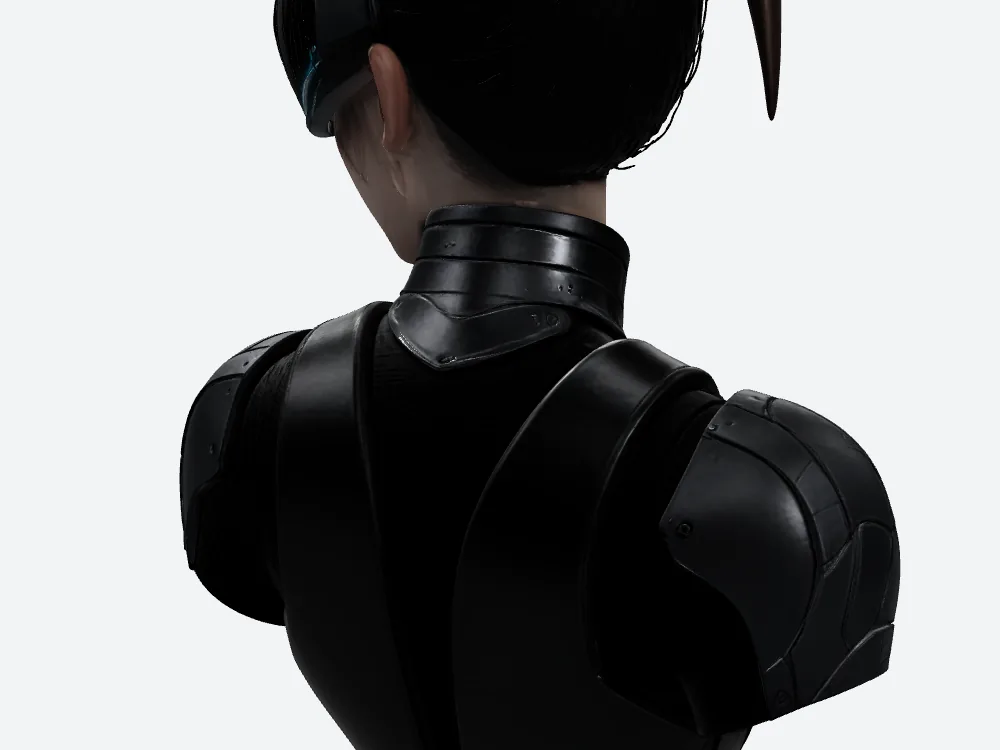
Same camera, other file, same caveat — neither tool had a reference for any of this.
Meshy from the front, straight on
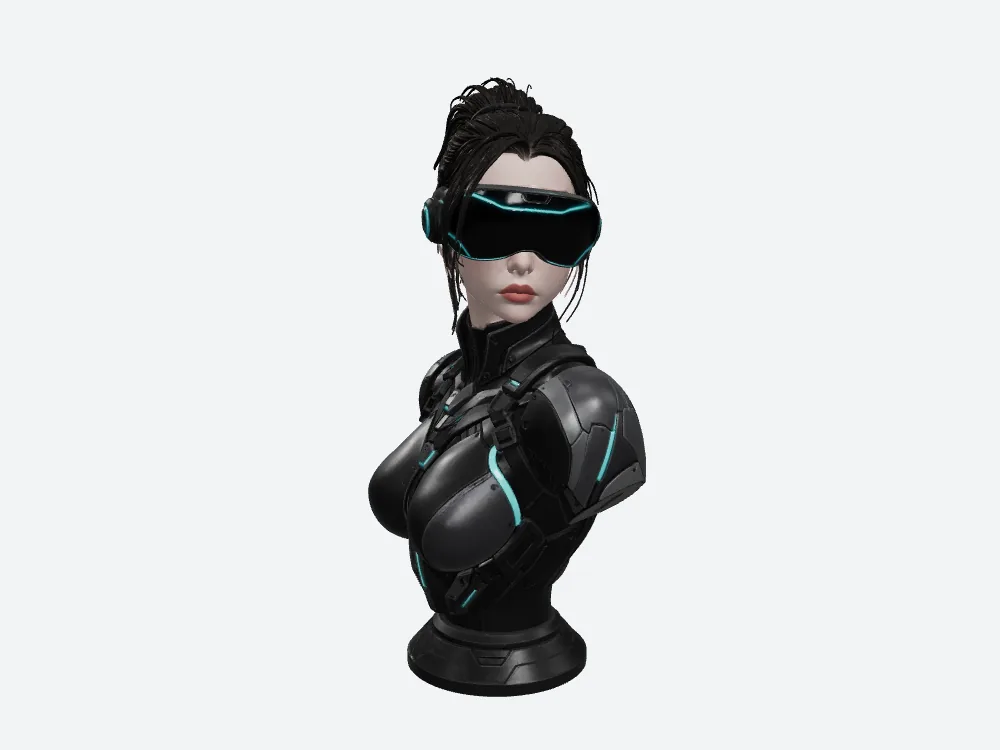
Meshy from the front. The visor reads as one broad slab with a single line of trim along the top.
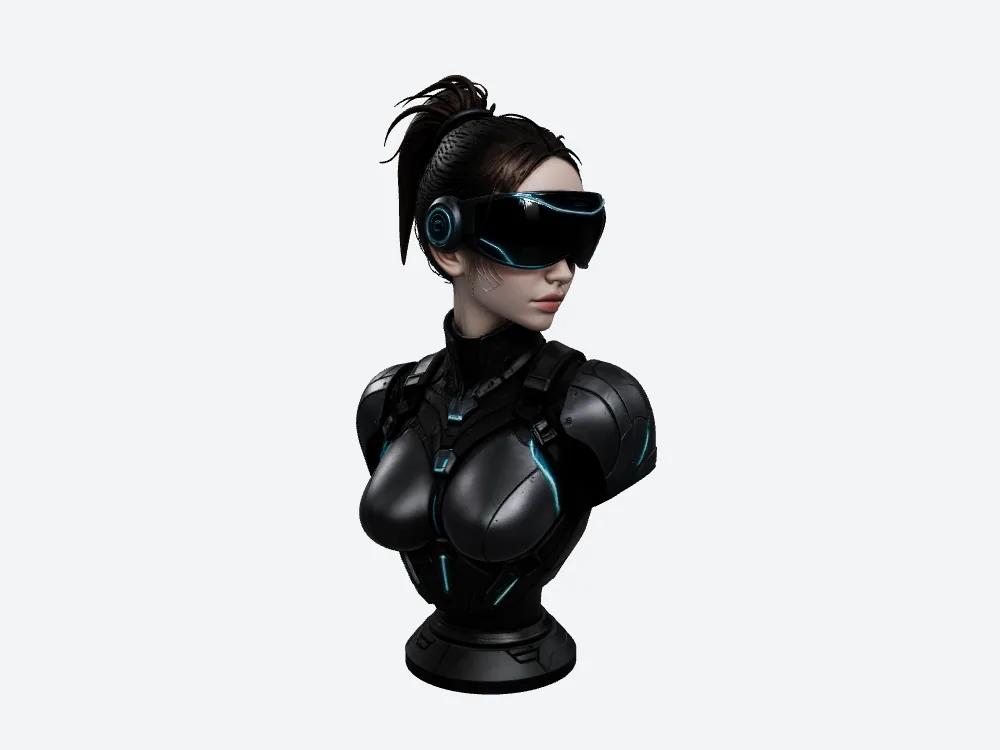
Same camera, other file. The visor has a bevel, and the trim follows the rim instead of cutting across it.
Where Meshy actually wins
Now the part where Meshy is straightforwardly right, and it's the flip side of everything above.
Those 4096×4096 maps cost memory. A lot of it. Meshy's three are 2048×2048 — a quarter of the pixels each, and a quarter of the load.
Force both sets to decode raw — no compression, no smaller mip levels — and Meshy's three maps come to about 50.33 MB. The other file's, about 201.33 MB.
Roughly 151 MB apart, in the one budget standalone headsets are stingiest with.
The exchange rate is simple. Meshy's 2K maps buy you a much lighter texture load and cost you the ear cup, the collar rings and the fine panel lines. If your target device is memory-bound, take Meshy's maps and accept softer close-ups. If your users get close — and in VR they always get close — pay the memory.
Meshy takes a second point too, and it's about what happens when you hand the file to somebody else.
A GLB can declare extensions it requires — pieces of the format the importer has to understand, or the file won't open at all. meshopt is one: a compression scheme that shrinks the file dramatically, as long as whatever opens it can decode it.
Meshy's file requires nothing. Empty list. It drops into a plain glTF importer with nothing installed.
The compressed SupaVoxel file requires two: meshopt compression and mesh quantization. Switch to the original-size export in the same menu and that decoder requirement goes away. I read this off each file's own requirements list — I never loaded either one into a specific piece of software, so I can't tell you whether the import then succeeds.
If all you have is one file and a client who won't install anything, that's Meshy's win and it's not close.
One more honest note on the sharper file. To put both models in a web viewer I ran each through the same conversion: Meshy's browser copy landed at 13.64 MB, the other at 7.58 MB, and that second conversion shifted the triangle count by 2. Tiny — but it's why every number in this article comes from the untouched original exports rather than the web copies.
Three things I won't claim about Meshy from these pictures
I didn't measure colour accuracy. No per-pixel comparison. The two models sit at different angles, so a pixel metric would be meaningless.
I didn't measure Meshy's generation time, failure count or retry count. None of it was captured, on either side. So no speed verdict from me.
I never put either bust on a headset. No frame rate, no memory reading. The texture numbers above are arithmetic, not a measurement off a device.
And the credits: 35 recorded on Meshy, 3 on the other. Two different plans, two different units — I'm not turning that into a price.
On timing, I have exactly half the picture. The other tool recorded a 268.043-second generation window — roughly four and a half minutes, download not included. Meshy's equivalent wasn't captured in this run, so there's no speed comparison here and I'm not inventing one.
So which one looks like the reference?
- Anything people get close to — the 4096 map file. The ear cup and collar survive.
- Memory-tight standalone headset — Meshy. Its 2K maps are about 151 MB lighter to decode.
- Background asset nobody inspects — Meshy's fine. Save the memory.
- Handing the file to a tool that won't install a decoder — Meshy opens as-is; on the SupaVoxel side you'd take the original-size export, which asks for nothing either.
- Judging by triangle count — don't. Meshy had a million more and still lost the details.
Final verdict: Meshy scores 62/100 for this job
Meshy turned one picture into a recognisable VR bust, with three textures and 2,490,490 triangles, for 35 credits on its own ledger — a different plan in a different unit from the 3 recorded on the other side, so not a price.
Up close, Meshy pays for those 2K maps. The ear cup flattens. The ponytail frays. The collar rings merge into one roll.
And in texture memory, Meshy wins outright — roughly 50.33 MB against 201.33 MB.
62/100, for this one job, one image, one run each. Not an average, not a verdict on Meshy across every subject.
Try it with your own image
Here's the test I'd recommend: run the reference you care about through Meshy and through the other tool, then zoom in on the one detail your project depends on. The buckle. The logo. The ear cup.
That's where the two files separate, and it takes ten minutes to find out.
The sharper one for my bust came from supavoxel.com — 4096 maps, 1,487,122 triangles, 12,385,676 bytes. Check your texture budget before you commit, and remember the export menu has both a compressed and an original-size GLB, so the importer question sorts itself out.
How I tested this
One reference image, made with GPT Image 2, uploaded to Meshy and to SupaVoxel with no text prompt on either side. One run each, GLB downloaded from both, both files hashed and parsed offline. Texture counts, pixel dimensions, triangles and vertices are read out of the files themselves, not from a product page.
Every render is mine: one offline viewer, fixed lighting, fixed resolution, identical camera numbers on both sides. Each GLB carries its own built-in orientation, so matching numbers don't produce matching poses — the pairs are two models under one camera, not a registered overlay. The three detail crops use the same normalized frame at the same camera: the same picture region, not the same anatomical patch.
The texture memory figures — about 50.33 MB and 201.33 MB — are arithmetic, not a device reading: three maps decoded as raw RGBA, no mipmaps, no runtime compression. Real engines rarely do that, so treat those as a sizing exercise.
My reading of the ear cup, the ponytail and the collar is exactly that — my reading of the renders. There's no likeness metric in this run. Credits come from the run record; Meshy's generation time and both sides' failure and retry counts weren't captured, and I've left them blank rather than guessing.
Originally published on Medium: Meshy AI 3D Review 2026: 2K Textures on a VR Helmet Close-Up.